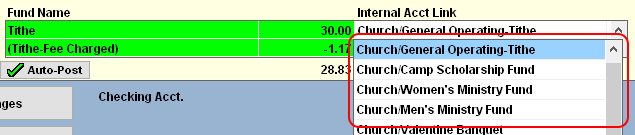
This problem is typically caused by the Auto-Post Deposit not having the correct internal account link.
- Open a new deposit entry by clicking Deposit.
- In the Auto-Post box, click the Show All Funds option.
- In the first column, will be a list of contribution funds. To the right of each fund will be an amount. To the left of the amount will be the internal account link. See the illustration below.
- Find the Contribution fund that is not being deposited into the correct account.
- If the internal account link is blank or is not the correct account, click on the existing link and a list of all available internal accounts will appear. Find the correct and account and double-click on the account to select it.
- Repeat steps 4 and 5 until all the internal account links are correct.
- Once all the links are correct, click the Auto-Post button. This will save the account links.
It is not required that the deposit be saved. Click Cancel Changes to return to the checkbook screen or Save Changes to post the deposit.
For more information see: