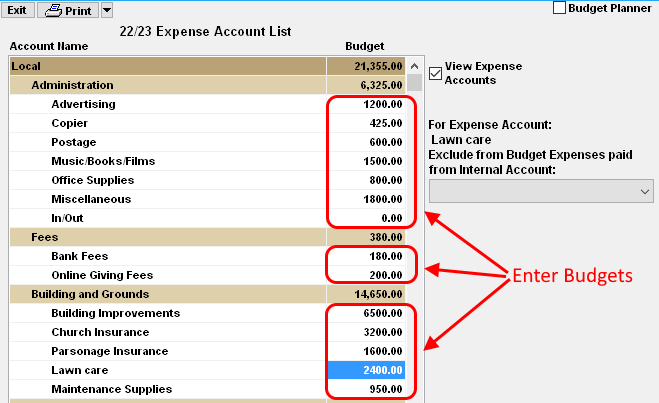
BUDGET definition: The forecasted cumulative expense amount for an Expense Account for the Fiscal Year.
example: If the Expense Account is LAWN CARE and the expense is typically $200/month, then the BUDGET would
be set to $2400.
- From the Checkbook screen, click on Setup and then Expense Acct List.
- To change a Budget Amount, click on the amount and then type in the new Amount.
- Click on another budget amount or press Enter to save the changes. To cancel a change, press the Esc key before pressing Enter.
Expense accounts are listed by Expense Category and group. The budgets for the categories and groups are automatically calculated by adding the budgets of all accounts within each category or group.
For more information see:
OPTION: If you would like to EXCLUDE expenses paid from a specific Internal account and therefore not be counted against the budget, then select the corresponding Internal account in the "Exclude from Budget" box. This Option is NOT COMMONLY USED.