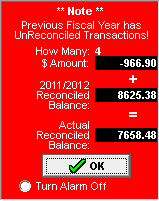
A flashing red amount next to the 'Fiscal Year Start Balance' indicates that the ending balance from the previous fiscal year does not match the starting balance for the current fiscal year. If this is the first year to use this program, this is to be expected. Click on the flashing red box or the red question mark. A small pop up box will appear. At the bottom, click 'Turn Alarm off' or 'Don't show note again' and then click OK.
As a general rule, the balances should match unless you know of some specific reason why they would not be the same. If you want to learn how to adjust your starting balances to match the previous last year's ending balance, please see How do I make last year's ending balance equal this year's starting balance?
A flashing red amount next to 'Reconciled Balance' indicates that there are transactions in the previous fiscal year that have not be reconciled. As soon as you have reconciled all the previous year transactions, the flashing red box will go away.
To stop the flashing box before all the transactions have been reconciled, click on the flashing red box or the red question mark. A small pop up box will appear. At the bottom click on 'Turn Alarm off' or 'Don't show note again' and then click OK.